
Overview
This guide explains how MCP-enabled LLM agents work with Gracenote metadata. Understanding this architecture is essential before building your integration.
The Gracenote Video MCP Server is based on the open Model Context Protocol created by Anthropic. MCP provides a standardized way for Large Language Models (LLMs) to access external tools and data, and is now supported by all major LLM providers.
The Three Components
Every MCP application has three parts:
- MCP Server (Gracenote provides) - Provides tools that return verified entertainment metadata
- MCP Client (Your code) - Connects to the server and calls tools
- LLM (Claude, GPT, Gemini, etc.) - Decides which tools to call based on user queries

What You Build vs. What Gracenote Provides
You Build:
- Orchestration Layer: Create the logic to execute the reasoning/action loop and maintain the context window. Orchestration frameworks like LangChain, LlamaIndex, or custom implementations simplify this.
- MCP Host Application: Integrate MCP client(s) to communicate with MCP server(s) and provide the application UI.
- System Prompt: Define the persona, constraints, and rules for the LLM. See System Prompt Guide for examples.
Gracenote Provides:
- MCP Server: Production-ready server with authentication and monitoring
- MCP Tools: Pre-built tools for entity resolution, streaming availability, and metadata access
- Grounding Data: Verified, real-time entertainment metadata
- Documentation & Support: Comprehensive guides, examples, and enterprise support
Key Terminology
Familiarize yourself with these terms before starting your implementation:
| Term | Definition |
|---|---|
| Context Window | The active, limited "working memory" of the LLM. It is the space where the Orchestration Layer aggregates the System Prompt, user query, conversation history, and the retrieved Grounding Data so the LLM can process them together to generate a response. |
| GN Video MCP Server | Provided by Gracenote, the server acts as a data enablement layer. It interfaces with underlying Gracenote APIs to retrieve, process, and package the Grounding Data in a format optimized for the LLM to consume. |
| Grounding Data | The factual, structured data provided by the MCP Server (via the MCP Client and MCP Host) after a tool call. This data is inserted into the LLM's Context Window, allowing the LLM to generate a truthful and relevant response (a grounded response). |
| LLM (Large Language Model) | The core machine learning model that acts as the central reasoning engine within the LLM Agent. It processes the text inputs supplied via the Context Window, determines the appropriate next action (including calling MCP Tools), and generates the final, human-readable response based on the Grounding Data it receives. |
| LLM Agent | Generally used to describe the entire AI system designed to achieve a specific goal. It is not just the client code; it's an architecture where the LLM is the reasoning component and the Agent is the orchestration component. |
| MCP (Model Context Protocol) | Connects LLMs with domain-specific information after a user query, providing verified and enriched contextually relevant responses. |
| MCP Client | A library or service within the MCP Host that handles the low-level communication with the MCP Server |
| MCP Host | The application or service that houses the Orchestration Layer and the MCP Client. It is the environment/client-side container where the LLM Agent's logic runs and initiates calls to the LLM and the MCP Server. |
| MCP Tools | Functions (or external capabilities) that the LLM Agent can call. These functions are implemented by the MCP Host and often leverage the MCP Client to fetch data from the MCP Server. The LLM decides which tool to call based on the user's request. |
| Orchestration Layer | The central part that orchestrates the reasoning/action loop of the LLM Agent, maintains the Context Window, provides the System Prompt and MCP Tool descriptions to the LLM, and interacts with the tools. This is the core of the agent, and it is created by a developer for a specific application. |
| System Prompt | A developer-defined template sent to the LLM by the Orchestration Layer that sets the persona, constraints, business rules, and can include the descriptions of the MCP Tools available to the LLM for function calling. |
| Training (Or Model Training) | LLMs are trained and fine-tuned by being fed an enormous amount of textual information. |
The Reasoning Loop
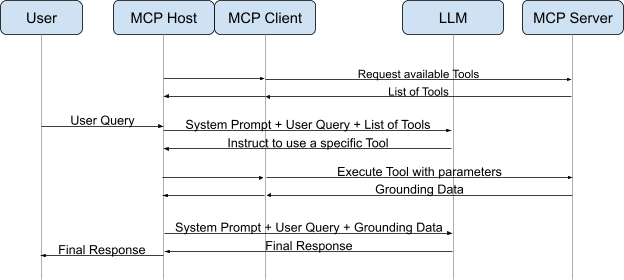
The interaction and reasoning loop below is the core of how MCP-enabled agents work. Here's what happens during a single iteration:
-
User Query:
- The user enters a natural language query into the MCP Host application (UI) describing the information they want.
- Example: "Where can I watch The Matrix?"
-
LLM Intent Analysis & Tool Selection:
- The Host Application sends the user query (along with the System Prompt and available MCP Tool definitions) to the LLM.
- The LLM analyzes the intent and determines it needs external data.
- It returns a Tool Call (structured output requesting a specific function, e.g., resolve_entities, get_availability).
-
Routing to Client:
- The Host Application detects the Tool Call.
- It passes this request to the internal MCP Client.
-
Request Transmission:
- The MCP Client formats the request using a predefined request schema and sends it to the Gracenote MCP Server.
-
Tool Execution:
- The MCP Server validates the request and executes the specific Gracenote tool logic, querying the underlying metadata APIs.
-
Grounding Data Return:
- The MCP Server receives the API response and packages the raw data into a standard object (text, image, or resource) adhering to a predefined response schema. This is the Grounding Data.
-
Context Injection:
- The MCP Client receives the Grounding Data and passes it back to the Host Application.
- The Host appends this data to the conversation history (context window) as a Tool Result.
-
Final Inference:
- The Host Application sends the updated conversation history (Query + Tool Call + Tool Result) back to the LLM.
- The LLM performs inference on this grounded context to generate a natural language answer.
-
Display:
- The Host Application receives the final text response from the LLM and renders it to the user via the UI.
Example: "Where can I watch The Matrix?"
Here's how the reasoning loop works in practice:
Step 1: User Query
Code
Step 2: LLM Receives Query and Tool Definitions
Code
Step 3: LLM Decides to Use a Tool
Code
Step 4-7: Orchestration Layer Calls MCP Server
The orchestration layer detects the tool call, forwards it to the MCP Server via the MCP Client, and receives the grounding data:
Code
Step 8: LLM May Call More Tools
The LLM now has the TMSID and might need availability data. This is why you see a while loop in the examples:
Code
Step 9: LLM Generates Final Answer
Code
Full Example
Here's the full example combining all steps, using LiteLLM for universal model support and GracenoteClient from Connecting to MCP:
Code